

Circle suits creators who want a clean, modular workspace for structured discussions and courses, while Mighty Networks fits those who want bundled features and stronger built-in mobile engagement. If you want to skip the platform juggling entirely, an owner-first, all-in-one tool that keeps your Stripe account and domain in your name solves the deeper problem both platforms leave unsolved: fragmented ownership and rising fees as you scale.
TL;DR:
- Transaction fees can outweigh subscription costs at higher revenue levels, making it essential to run break-even analyses before upgrading plans.
- Automated moderation and bulk actions are crucial for scaling communities, so verify these features and export options early to simplify migration.
- Mobile engagement depends heavily on the content format; push notifications and native apps benefit daily habit communities more than occasional users.
- Cohort courses require precise drip scheduling and progress tracking, while evergreen content benefits from greater discoverability within the community library.
- Ownership of the community’s data and payments is limited with both platforms, so consider self-hosted solutions to retain complete control as your community scales.
Table of Contents
- Circle vs Mighty Networks at a Glance
- How Much Will Circle or Mighty Networks Actually Cost You?
- How Do Members and Admins Actually Navigate Each Platform?
- How Should You Structure Spaces, Chat, and Events?
- Which Platform Handles Cohort and Evergreen Courses Better?
- Do You Need a Branded Mobile App or Is Web Enough?
- What Automation, AI, and Integrations Should You Expect?
- How Do Moderation Limits Affect Scaling Your Community?
- Which Platform Style Fits Your Creator Business?
- What I'd Actually Tell a Creator Choosing Between These Two
- A Different Way to Own Your Creator Business
- Sources
Circle vs Mighty Networks at a Glance
The real decision isn't about which platform has more features. It's about which trade-off you can live with: admin convenience versus member-facing polish. Ember Consulting's comparison frames this as the core architectural split between the two: one prioritizes a modular, workspace-style member experience, the other bundles features into multi-purpose spaces that make admin life easier.
Before you pick a side, weigh these axes against how you actually plan to run your community:
- Pricing structure: flat subscription tiers versus subscription plus per-transaction fees on content sales.
- Member and admin limits: some plans cap admin seats tightly; others scale admins more freely but charge for it.
- Course features: drip scheduling, quizzes, and certificates vary in depth and where they sit in the pricing ladder.
- Mobile apps: native branded apps versus responsive web experiences.
- Automation depth: built-in rules engines versus reliance on third-party connectors like Zapier.
- Learning curve: how long it takes a non-technical admin to get a working space live.
Workspace-style platforms tend to reward communities that value structured discussion and clean navigation over flashy bundled features, according to practitioner reports collected by WhichCommunity. Bundled-space platforms tend to win when discovery and mobile-first engagement matter more than granular control.
If your monthly content revenue is still small, subscription cost typically dominates your decision, but as revenue increases, transaction fees become more significant, changing the cost dynamics.
How Much Will Circle or Mighty Networks Actually Cost You?
Sticker price is the least useful number on either pricing page. What matters is total cost: subscription plus transaction fees plus the add-ons you didn't budget for. Here's how to model it properly.
- Start with the base subscription for the tier that unlocks the features you need, not the cheapest tier available.
- Add transaction fees as a percentage of gross content sales, if the tier you picked charges them.
- Layer in hidden costs: extra admin seats beyond the included count, API access (often gated to top tiers), white-label mobile app fees, and premium integrations.
- Multiply by your realistic monthly revenue, not your optimistic one, and recalculate quarterly as revenue grows.
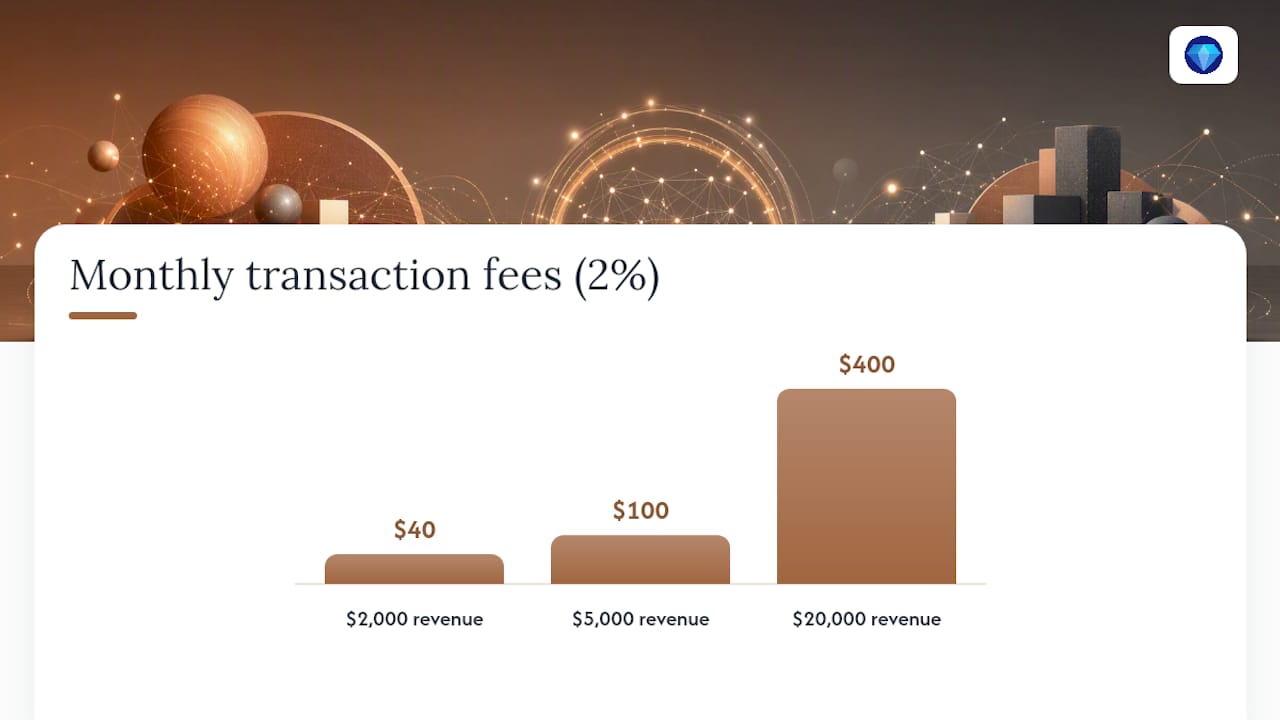
Quick math: Ecommerce-platforms found starting prices and transaction fee schedules differ enough between the two that the cheaper platform for a $2,000/month creator can become the more expensive one at $20,000/month, once fees compound against a growing revenue base.
Three scenarios make this concrete:
Starter creator with small content sales typically benefits from a lower base subscription price, as transaction fees are minimal at this scale. Choose the platform that offers the easiest learning curve.
Scaling creator ($5,000/month): this is where the math gets interesting. A plan with no transaction fees but a higher monthly subscription can break even against a cheaper plan that charges 2 to 5 percent per sale, somewhere in the low thousands of dollars in monthly revenue. Run the numbers before you commit to either.
High-revenue creator ($20,000+/month): transaction fees compound fast at this level. Practitioner-level break-even analysis suggests creators at this scale often save more by moving to a flat-fee or zero-transaction-fee model, even if the base subscription looks steeper on paper.
Pro Tip: Calculate your break-even revenue before you sign an annual contract. Divide the subscription price difference between two plans by the transaction fee percentage difference. That gives you the monthly revenue where the more expensive plan starts paying for itself.
How Do Members and Admins Actually Navigate Each Platform?
Navigation shapes retention more than most creators expect. A workspace-style layout uses a sidebar to separate spaces, courses, and events into distinct sections, which keeps things tidy but requires members to know where to look. A bundled multi-feature space folds several functions into one scrollable feed, which lowers the learning curve for new members but can bury older content fast.
Onboarding flows matter more than either platform's marketing suggests. A welcome sequence that walks a new member through profile setup, a first post, and a discovery map of active spaces drives meaningfully better Day-7 retention than dropping someone into a blank feed. Ember Consulting's analysis points to this discoverability gap as one of the sharpest differences between the two archetypes.
On the admin side, the workload differences are real:
- Workspace platforms tend to give admins more granular control over individual spaces, which helps with structured communities but adds setup time upfront.
- Bundled platforms often ship more automation out of the box for common tasks like welcome messages and member tagging, cutting daily admin time.
- Both platforms support saved replies and moderation queues, but the depth of bulk-action tools varies by tier.
- Admins managing multiple cohorts report faster ramp time on platforms with clearer space templates versus building navigation from scratch.
If you're a solo creator without a dedicated community manager, prioritize whichever platform gets a new member from signup to their first meaningful action in the fewest clicks. That number matters more than any feature list.
How Should You Structure Spaces, Chat, and Events?
Structure decisions made in your first week often determine whether members come back in month three. The mistake most creators make is over-splitting their community into too many spaces before they have enough activity to fill them.
Use dedicated spaces when a topic or format needs its own rhythm: a weekly Q&A, a course discussion thread, or a paid mastermind that should stay separate from general chatter. Combine features into a single space when you're still testing what your community wants; a general discussion space that also hosts light events keeps early engagement concentrated instead of scattered.
Cohorts, live events, and course content interact more than most setup guides admit. A cohort-based course benefits from its own dedicated space with a pinned schedule, while an evergreen course usually lives better inside a resource library that doesn't need constant moderation. Live events tend to spike engagement in whatever space hosts them, so pointing event chat back to a relevant discussion space afterward keeps momentum from dying the moment the event ends.
Practical setup rules that hold up across both archetypes:
- Name spaces by function, not by vague vibes; "Course Q&A" beats "Chat Room 2" every time.
- Pin an onboarding post at the top of your main space with links to every other active space.
- Keep course content and social discussion in separate spaces unless your community is small enough to combine them without noise.
- Archive dead spaces quarterly instead of letting them clutter navigation.
Pro Tip: If your community has more than five active spaces and engagement is dropping in most of them, you don't have a platform problem. You have a structure problem. Consolidate before you blame the software.
Which Platform Handles Cohort and Evergreen Courses Better?
Cohort-based programs and evergreen courses need different tooling, and picking the wrong platform for your course format creates friction you'll feel every single launch. Workspace-style platforms tend to handle drip scheduling and structured modules with more granular control, which suits cohort educators who need content to unlock on a strict calendar. Bundled platforms often integrate course content more tightly with community feed activity, which can help evergreen courses stay visible longer without a hard push.
Certificate and progress tracking support varies more than creators expect going into a purchase decision. Some tiers include certificates as a baseline feature; others gate them behind a higher plan or treat them as an add-on entirely. Quiz depth also differs: basic knowledge checks are standard, but branching logic or graded assessments tend to sit higher up the pricing ladder on both platforms.
A few things to check before you commit your curriculum to either archetype:
- Confirm whether drip scheduling can be tied to enrollment date or a fixed calendar date; cohort programs usually need the latter.
- Check if quizzes support scoring thresholds that gate progress to the next module.
- Verify certificates generate automatically on course completion rather than requiring manual admin approval.
- Test whether course discussion threads stay attached to the right module or dump into a general feed.
- Ask whether course progress data exports cleanly if you ever need to migrate.
If you're running a cohort model with hard deadlines and live sessions, lean toward whichever platform gives you the tightest drip and scheduling controls. If you're building an evergreen library meant to sell on autopilot, prioritize discoverability and search within the course library instead. Educators who blend both formats, running a cohort launch that later becomes a self-paced library, should test how easily content converts from one mode to the other before locking in a full curriculum on either platform.
Do You Need a Branded Mobile App or Is Web Enough?
Mobile matters more than most creators budget for. Mobile devices already account for a majority of web traffic worldwide, and community engagement skews even more mobile than general browsing, since members check in throughout the day rather than sitting down for long sessions.
A native branded app tends to materially improve retention when your community relies on push notifications to drive daily habits, think fitness challenges, daily prompts, or time-sensitive event reminders. If your engagement pattern is more occasional, a responsive web experience accessed through a bookmarked link often performs just as well without the added cost.
Branded apps carry real costs and timelines that both platforms handle differently:
- Expect a multi-week setup and review process before a white-label app appears in app stores, even after your account is configured.
- Branded app access is typically gated to higher pricing tiers, adding meaningfully to your monthly cost.
- App store review cycles mean any major redesign takes days to propagate to members, unlike instant web updates.
- Push notification strategy needs its own plan; blasting members daily burns goodwill fast.
Before committing to a branded app, pilot with web push notifications first. Track opt-in rates and click-through over a few weeks. If web push already drives strong return visits, a native app may just add cost without adding retention. If web push underperforms and your content format is genuinely daily-habit-driven, that's your signal to invest.
What Automation, AI, and Integrations Should You Expect?
Built-in automation saves admin hours that third-party tools can't fully replace, but it's rarely available on entry-level tiers. Basic workflows, welcome messages, tagging new members, auto-archiving inactive spaces, are common baseline features. More complex automation, like triggering a drip email sequence based on course progress, often requires connecting through Zapier or a similar connector, which adds both cost and a layer of technical maintenance.
AI features are where the tiers really diverge. Ecommerce-Platforms.com's analysis notes that built-in AI on lower pricing tiers changes the calculation significantly: if you need automated member matching or AI-generated icebreakers to keep a large community warm without manual moderation, check whether that capability is included at your price point or reserved for enterprise tiers before you commit.
Integrations you should confirm before signing up, regardless of platform:
- Payment processing: how the platform connects to Stripe, and whether you retain direct ownership of that account or the platform sits between you and your funds.
- Email provider syncing: whether member data flows automatically to your newsletter tool or requires manual export.
- Zoom or live event tooling: native integration versus manual link-sharing for scheduled sessions.
- Analytics depth: whether you get cohort-level engagement data or just aggregate numbers.
- API access: gated to top tiers on most platforms, and essential if you plan custom automation down the line.
If you're already running Zapier workflows for a business elsewhere, factor in that maintaining those connectors across a community platform adds ongoing admin time few creators account for at signup.
How Do Moderation Limits Affect Scaling Your Community?
Admin caps quietly become the most expensive line item as your community grows. Many plans include a small number of admin or moderator seats, then charge per additional seat once you exceed it, a cost that compounds fast if you're building a team around a growing membership.
Here's how to prepare for that scaling friction before it hits you:
- Audit your admin cap now against your growth plan for the next twelve months, not just your current team size.
- Prioritize platforms with strong automated moderation, keyword filters, spam detection, and bulk actions, since these reduce how many human moderators you need per thousand members.
- Test bulk-action tools before you scale: can you approve, remove, or tag dozens of members at once, or does everything require one-by-one clicks?
- Confirm your export options before you're locked in. Migration best practice means exporting your member list, content, and course progress metadata early, since many platforms leave progress data and certificates out of simple export packages.
- Document your moderation rules in a shared playbook so a new admin can ramp quickly instead of learning your community's norms by trial and error.
Practitioner reports collected by WhichCommunity note that workspace-style platforms tend to scale structured moderation more predictably, while bundled platforms lean on stronger automated discovery to keep engagement up without proportional headcount growth. Neither approach eliminates the need for human judgment once you cross a few thousand active members.
Which Platform Style Fits Your Creator Business?
Match your situation to a profile before you shop features, because the right platform for your business rarely matches the one your favorite creator uses.
Solo creator testing an idea: pick the cheaper entry tier with the fewest restrictions on member count, even if it charges transaction fees. You need to validate demand before you optimize cost structure.
Cohort-based educator running scheduled launches: prioritize drip scheduling precision, quiz depth, and certificate support over bundled social features. Your members care about the curriculum, not the feed.
High-revenue membership business: run the break-even math from the pricing section above before renewing any annual plan. At meaningful monthly revenue, transaction fees often outweigh a lower base subscription within months.
Brand or organization running live events and cohorts together: weigh mobile engagement and push notification strategy heavily, since event-driven communities live and die by how fast members see a reminder.
Three questions to ask before you decide:
- How much of your revenue currently comes from content sales versus subscriptions or sponsorships? This determines whether transaction fees or flat subscription cost dominates your total spend.
- Do your members expect a native mobile app, or would a well-built web experience meet their habits? Skipping an unnecessary branded app saves real money in year one.
- How many admins will you realistically need in twelve months, and does your target plan's admin cap support that without a costly upgrade?
Once you've answered those, run a short pilot rather than committing to an annual contract cold. Build your top two spaces, invite a small test group, and track Day-1 and Day-7 retention before you migrate your full community and content library over.
What I'd Actually Tell a Creator Choosing Between These Two
Most comparison articles treat this as a feature checklist. It isn't. The real question is which operational trade-off you're willing to live with for the next two years, because switching platforms after your community has real momentum is expensive in ways that go beyond money. You lose posts, course progress, and the social proof of an active feed the moment you migrate carelessly.
Here's what gets underweighted in most breakdowns: transaction fees are the silent tax that creators budget for at launch and forget about at scale. Run that math before you sign anything longer than a monthly contract.
Three tactical steps if you're testing a new platform this quarter: run a two-week pilot with real content and a small member group, measure Day-1 and Day-7 retention rather than trusting your gut, and export a full backup of your current community before you touch a migration button. If you're moving off Circle or Mighty Networks entirely, check migration support before committing to a specific timeline, since course progress and certificates rarely travel cleanly between platforms.
The deeper issue neither platform solves is ownership. You're still renting your payment relationship and your domain presence from a third party, and that has real consequences the day you want to leave.
— Jed
A Different Way to Own Your Creator Business
Circle and Mighty Networks both put your payment processing, your domain, and your audience relationship inside their walls. There is an alternative approach that lets you run your community, courses, and newsletter on your own domain and connect to your own Stripe account, so you keep ownership of your money and audience relationships.
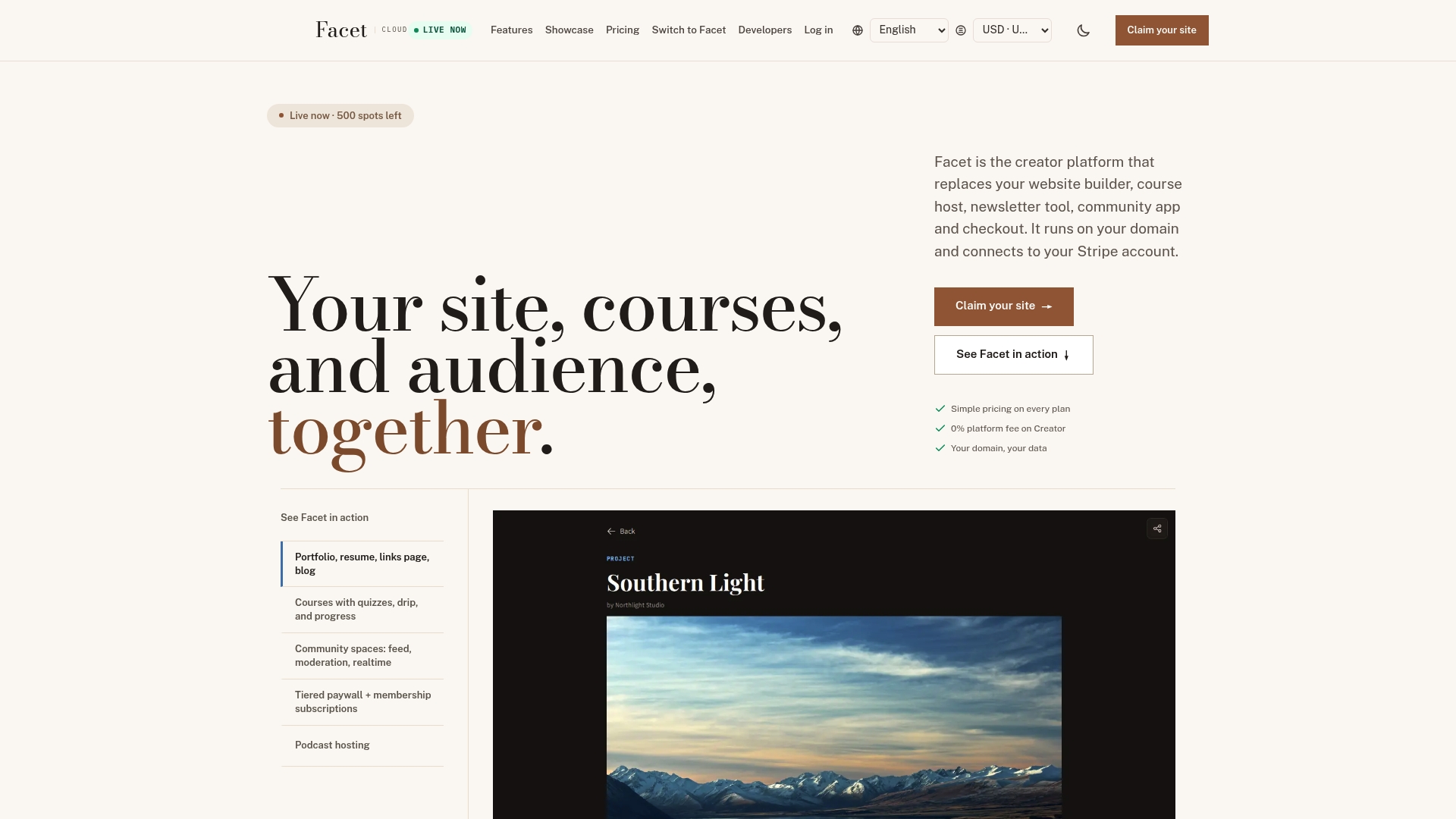
That distinction matters most for the exact creators this comparison targets: educators running cohort courses who also want a newsletter and a paid membership tier, without stitching together four subscriptions to do it. Get-facet's feature set bundles course management with quizzes, community engagement, and payment processing into one platform, and the pricing pledge means no platform fees on your content sales at the top tier, a direct answer to the transaction-fee math covered earlier in this comparison.
If you're weighing whether to renew an annual contract with either platform, run a short pilot on Get-facet first. Check the pricing against your own revenue scenario, and see whether consolidating your toolchain changes your break-even number before you commit another year elsewhere.
Sources
For deeper feature-by-feature detail, the Circle vs Mighty Networks comparison on G2 breaks down aggregated user ratings by category. Ember Consulting's 2025 analysis covers the architectural trade-off in more depth, and Ecommerce-Platforms.com's pricing comparison walks through current cost structures for 2026. For the owner-first alternative discussed above, see Get-facet's feature overview and pricing details.
- Circle vs Mighty (2025 comparison): Which platform is right for your community? — Ember Consulting
- Ecommerce-platforms